Taking the Shortcuts

tips writing

Monday Morning Message ~ 3-7-2011

It doesn’t take long to learn some valuable “shortcuts” that will save you and your students time in the lab.

Basic to student instruction and use are the usual shortcuts keystrokes for:

Copy (Ctrl+C)
Paste (Ctrl +V)
Cut (Ctrl +X).

We teach these to our students in the first week, and find they catch on quickly and grow to use these instead of the “Pull-down Menus”.

One more you can add to their/your repertoire is:

   Tab (Ctrl+T)

This allows the students to quickly open up another tab and to work side-by-side when researching and collaborating. By allowing them to use additional tabs open while on the internet, they can save the tabs on the bottom for files/folders they need to access on their computer.

With 30+ computers to shut down every evening, our students use another quick shortcut that gets the job done quickly.

Shortcut to shutting down computers:

  1. To close all windows, press (Alt+Space Bar)
  2. Together (Ctrl+Windows Key) with left hand and (Up Arrow) with right hand.
  3. Hit “Enter”, “Enter”.

Your lab has been shut down, and you can rest knowing your job is finished for the day.

If you are living in the State of Illinois, enjoy your Pulaski Day off, if your district observes it.

Shannon has to work today, but I am lucky enough to have the day off before I return to our first day of ISATs. If you were able to finish yours last week, enjoy your return to normal. We will start in with “Day 1” on Tuesday.

Regardless, have a great week!

Is Anyone Listening? (Part 4 of 4)

classroom management email tips writing

Monday Morning Message ~ 2-28-2011

Your Distribution List is made, and you are ready to send out your first note.

Remember, you promised your parents that you would keep their email addresses confidential!

It’s easy and the secret is…

Bcc (or “Blind Carbon Copy”).

The benefits of sending emails to recipients using the Bcc Option is that it

   1. keeps addresses confidential;

   2. protects recipients from receiving spam; and

   3. protects recipients from receiving a reply when
someone accidentally selects “Reply All”.

When writing your note, address it to yourself using your school address.
Next, choose the Bcc Option, and use the Distribution List contact name as the recipient.

Another benefit of using this option is that you will also receive a copy of your note, in addition to the one that is in your “Sent Folder”.

One more reminder:

You might want to use the day/date as your Subject.
This also helps parents keep track of notes/reminders.
If your note contains important information or deadline reminders, you might want to use that as your subject to get their attention.

You are now on the road to being heard, and more important, they are listening!

Have a great week!

Is Anyone Listening? (Part 3 of 4)

classroom management email tips

Monday Morning Message ~ 2-21-2011

Great! Every one of your parents responded to your email address request!

Now how in the world are you going to email every single one of those people every single day?

The answer is easy.

It’s called a “Distribution List”.

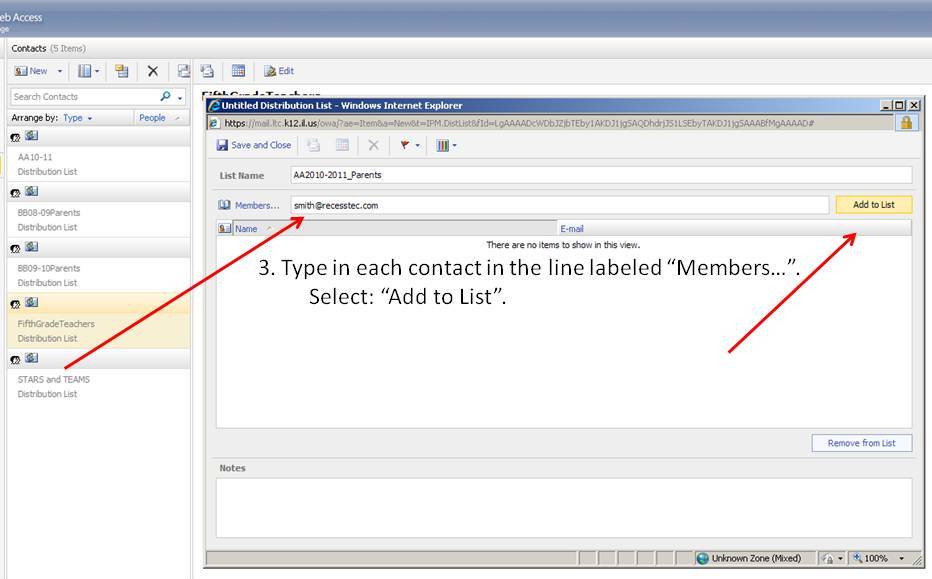
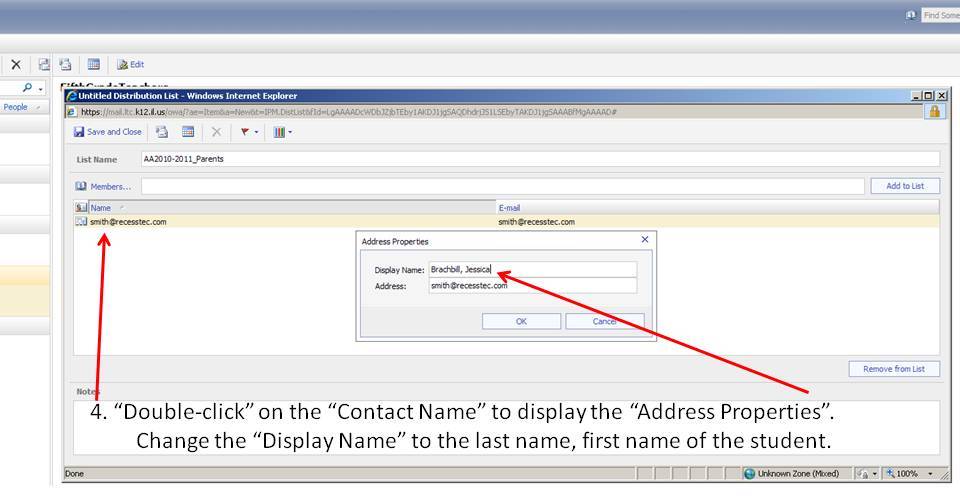
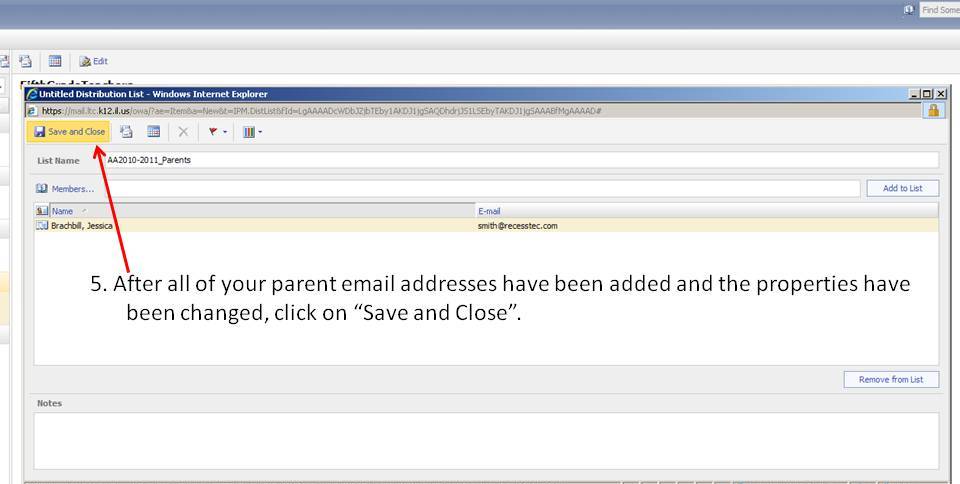
I have included step-by-step images and instructions to help you create this time-saver.

Finally, be sure to check back next Monday to see how to keep your parent emails confidential!

If this Monday you are observing Presidents’ Day with a day off from school, enjoy your day,
and be sure to do something for yourself…

Step 1


Step 2


Step 3


Step 4


Step 5

Is Anyone Listening? (Part 2 of 4)

classroom management email tips

Monday Morning Message ~ 2-7-2011

You read the word, “Email” last week, and now you will begin to see how a daily email note to your parents will solve a lot of “communication” problems.
Let’s start with the necessary steps to begin the implementation of your new system.

The first day of student attendance is quickly approaching.
Your weekends and days are filled with organizing your room, finalizing first lesson plans, and memorizing your student names on your new class list.
As youParent Signature Needed! fill your students’ “First Day Folders”, make sure you include the “Parent Email Note”.

Your “Parent Email Note” is the first step.

Send home this note on the first day, and then present it to your parents at the first Parent Orientation Night or Open House.
This note must be your first priority at starting your new year.
Getting every parent “onboard” is essential.
Remind them they can use any email address.
They may also use as many as they want.

Notice in your note that you make three promises.

Promise #1: Keep their email address confidential.

Promise #2: Write daily.

Promise #3: Don’t, and again, NEVER spam your parents’ in-boxes.

Remember many of your parents are professionals, as we are.
They use their emails to conduct business.
Also, an increasing number of parents receive their email on their cell phones.
Keep it short, and keep it simple.

Below we have provided a link to a template of the “Parent Email Note”.
Please feel free to adapt and use this to get started on the road to the best school year yet.

Finally, join us next week to learn how to keep the three promises.

ParentEmailNoteTemplate

Is Anyone Listening? (Part 1 of 4)

classroom management email tips

Monday Morning Message ~ 1-31-2011

You work hard writing, editing, and finally publishing your class newsletter. It’s filled with important topics like field trips, your week in review, and students’ upcoming tests.

Picture AND fundraiser money are due, and the permission slips for next week’s field trip.

Top that off with finding just the right piece of clip art and seasonal font, to make YOUR newsletter something you are sure will be kept in a memory box forever.

The reality is that today’s parents are different than yours were.
And all of your hard work is failing.

Parents are busy just like you.

Do you want to get through to parents?
Do you want to save trees?

Do you want to regain some of your busy life?

Everyone is busy every day all of the time.
That includes your students and their families.
Most of the time, student book bags are cleaned out, and after your notes and newsletters are skimmed through quickly, they go straight into the trash after mom or dad asks, “Hey, do we need this paper anymore, or can I throw it away?”

You have to get with the times if you want to get through to your students’ parents.

Face it.
The days of the mimeograph and ditto machines are over.
Telephone calls take up too much time, and callbacks waste even more of your precious time.

The solution to all of this is email.

We can’t wait until next Monday when we will continue with our four-part series to help you set up a quick system to get you on the road to productive, easy communication with your students and their parents.

In the meantime, enjoy your Monday, your week, and your students!

Splitting the Text

SMARTBoard tips writing

Monday Morning Message ~ 1-24-2011

We have found a great hidden tool within the SMART Notebook 10 Lesson Activity Toolkit. Called the “Text Splitter”, it will split up sentences into words, or words into individual letters.

After you have placed this little tool onto a new page in your Notebook document, simply highlight text from a document or from the Internet, copy it, and paste it onto your page. Next, drag it into the text splitter window. Choose to split it into words or letters, and your text is instantly interactive.

Do you already have spelling lists typed in a Word document? Now you can drag each word into the “Splitter” to instantly separate it so your students can respell it.


For another idea on using this tool in a Language Arts lesson, watch this quick little video. To get the “big picture” we suggest you watch it in “Full Screen” mode.

We welcome any comments to share how you might use this new “BFF”.

Stretching the Limits

Photography tips

Monday Morning Message ~ 1-17-2011

You have taken a picture of each of your students to put on the front cover of their individual annual classroom memory book. All year long you have captured images of your kiddos doing creative, educational, and innovative activities. You open your favorite publishing program to put it all together with the clock ticking away. So many pictures, so little time, and so many pages. You insert your pictures, re-size, move them all around to make them fit, and write your captions.

Finished.

But wait! Did your students go to the local amusement park and stand in front of the crazy mirrors? They are all too wide, or stretched too long. That is definitely NOT the look you are going for.

I saw this exact thing happen walking through the teacher workroom last May. The parent volunteer was assembling the books, and was not happy with how her child looked.

Here is a simple solution:

  1. When resizing any object, whether it is a picture, a shape, or a text-box, grab a corner, and hold down the shift key while dragging it to enlarge or make it smaller. This will retain the proportion of your image/shape in one easy step. Your pictures will look great, and you will look like you know what your are doing!
  2. This works across most programs such as SMART Notebook 10 and all Microsoft Office applications.

So with that, start working on those “End of Year” projects now, a little here and a little there, and if we can help in any way, just email us.

Have fun this week!

Monday Morning Message ~ 1-10-2011

Blog reflections tips

Monday Morning Message ~ 1-10-2011

With the new year, and some changes we foresee, the “Recess TEC Team” is making a new commitment.We have questions, too...

We are both asked many questions as we travel to different schools for training and presentations.
Our in-boxes are filled with more questions, and…
we often ask ourselves questions.

The difference between the questions we are asked, and the questions we ask ourselves is that;

1. most of the time we know the answers to questions asked, and
2. of the questions we have for ourselves, we know where to get the answers.

So Recess TEC has decided to share ideas, tips, suggestions, websites, and thoughts that might help you facilitate technology in your classrooms.
Our goal is to make technology fun for you and your students. We have worked with teachers who are frustrated with technology and have grown discouraged when they can’t get it to “work”.
What we do best is to break it down to the “least common denominator” and add fun and enthusiasm.
We always include things that are free, practical, appropriate, and relevant.

When we learn new things, we get excited about teaching.
And when we are excited about teaching,
our students are excited about learning.

So, check back with us each Monday, and we look forward to some “recess” time with you.

Guest Post: Miffy’s Trip to Chicago

Conferences SMARTBoard

I would like to introduce our readers to Miffy.  Miffy is our classroom foreign exchange student from Hilversum, Netherlands.  She is a perfect example of how using distance learning projects can connect student from across the globe.  We are excited, as a 4th grade class, to communicate with our classmate “Illini Bear” via our classroom blog.  Miffy just posted on her page  and I thought you might all enjoy a recap of our busy weekend last weekend through Miffy’s perspective.  She was a very well-behaved traveler! 

Miffy at IETC

Wow. I sure was busy with Mrs. Smith last weekend. I got to go with her to Chicago. That isn’t all. We also went to Springfield. But I didn’t get to see any of the Abraham Lincoln sites. We had to go to the Crowne Plaza hotel to present ways to use the SMARTBoard in the classroom. The room was packed full of teachers, administrators, and technology specialists. I was kind of nervous. Especially once I had the microphone clipped to my dress. Since I haven’t used the SMARTBoard too much, I was glad that Mrs. Smith and Mrs. Brachbill (Mrs. Smith’s mom) did most of the talking. They didn’t even get through their list of 10 ideas because the crowd kept asking them so many questions. It was pretty fun!

After we finished packing up all of the technology equipment, we went and listened to some other people speak about using technology in schools. It seems Mrs. Smith finds that to be pretty interesting, because she talks about it with anyone who will listen! I was pretty excited for what came next.

Check Out That VIEW!

We got to head to Chicago. That is me sitting on the dashboard of the car so I could see the city skyline. It was pretty incredible. The town where I am visiting, Tuscola, is pretty small, so getting to go to Chicago is a pretty big deal. We walked down Michigan Avenue. It is called “The Magnificent Mile”. There are a lot of shops and restaurants, and it was really crowded with people. I got to go to the famous Gino’s Pizza place where we stuffed ourselves full of deep dish Chicago Style pizza. It was YUMMY!

Miffy at IASB, IASA, IASBO Conference

On Saturday morning there was more presenting. This time we presented general technology ideas to a HUGE room with more than 300 people. The audience was school board members and administrators. Mrs. Smith and her mom wanted to make sure they knew how important it is for kids to get to use technology in school. They seemed to like the presentation because they laughed a lot and asked quite a few questions. This time I didn’t have to wear a microphone on my dress. I just had to stand really close to the microphone on the podium so the people all the way in the back could hear me.

The Magnificent Mile

 After the presentation, there was a huge festival downtown where they had a parade and fireworks. They lit up all of the trees along Michigan Avenue. It was really pretty! I had a really great time with Mrs. Smith, but it is nice to be back in Tuscola. I can’t wait to tell you all about my Thanksgiving with Benito! Talk to you soon, Miffy

One Busy Week

Conferences SMARTBoard workshops

This week is going to be a super busy one! 

 We will be at the ROE in Charleston on Wednesday for an evening session.  Mom and I are going head-to-head for a Web 2.0 Smackdown!  Don’t worry, I will keep you posted on who wins.  If I had to predict, it would be me.  I might have a little competitive streak in me.  Just a little.

Friday we will be getting EARLY to head to Springfield for the IETC conference.  A SMARTBoard session is in order.  We have put together 10 Ways to Get SMARTer.  It was SO hard to decide what to include.  I wish the session was longer than 50 minutes so we could include more.  Including something for all levels of SMARTBoard users along with subject areas, and grade levels was a challenge, but I think we have managed to do it.

After the conference on Friday, we are heading up to Chicago to join @principalspage for the IASB convention.  While we have been attending this conference for quite a few years now, it will be the first time to present there.  We are teaming up with Dr. Richard Voltz for a Top 10 Technology session in which we will count down our favorite ways to incorporate the use of technology in our classrooms.  Dr. Voltz will be presenting his Top 10 and will explain how they apply from an adminstrator’s point of view.  We will present ours from the classroom perspective, obviously.  Can’t wait!

Updates will be posted once we have time to catch our breath.  It has been a super busy fall and I can’t believe that we have neglected the blog for as long as we have.  It is time for that neglect to come to an end.

Shannon